Behavior Driven Development (BDD) with SpecFlow and ASP.NET MVC
Test Driven Development (TDD) has been around for about a decade, and has been mainstream for at least five years now. During this time, TDD practitioners have been gradually changing and refining the methodology, the mindset, and the terminology in an effort to increase its usefulness and avoid some of the problems that newcomers often experience.
The mindset and terminology has shifted so much that some folks have started using a new name for the updated methodology: BDD. Here’s a brief overview*:
-
**Test Driven Development **seeks to improve software quality by getting you to follow an iterative workflow often called red-green-refactor. In theory, it keeps quality high because if any change breaks earlier functionality, you should be notified by way of a failing test. Also, it should help you to make more pragmatic decisions about what code to write, because you only write the simplest code needed to make all your tests pass. <div style="margin:1em 0 1em 0"> Despite its unfortunate name, it became clear over time that TDD’s greatest potential benefit is not as a technique for testing code or detecting bugs, but in fact as a code design aid, because it provides a precise mechanism for specifying how your code should behave before you get mentally caught up in the actual implementation. However, in reality, I’ve seen many developers still struggle to break free from a test-oriented mindset and continue to amass reams of unit tests that simply exercise every possible code path without usefully describing what this proves or why it represents correct behaviour. This doesn’t aid design, very rarely detects bugs, and yet consumes a huge amount of maintenance time. </div>
-
Behaviour Driven Development retains the basic red-green workflow, but dramatically puts the emphasis on specifying behaviours that are understandable to people (often, business domain experts). It addresses questions such as “How much should I specify?” and “How should I organise and name my specifications so they are most useful?” <div style="margin:1em 0 1em 0"> To do this, BDD says you should elevate your mind to a level of behavioural abstraction above the code implementation. So don’t say “Constructor_Test” or even “Constructor_NullParam _ThrowsArgumentNullException” but instead say “A shipment cannot be created without a recipient address”. The change of emphasis and terminology leads people to write more useful specifications. </div>
I won’t focus on the term BDD itself, because the term is not hugely useful: nobody has ever given it a precise definition as far as I’m aware, and there isn’t a lot of consensus about what it should mean (some say it should only be about the UI; others say not). Instead, in this blog post, I’m going to focus on the major tools that have come out of the BDD stable and the advantages they can give you.
Unit level or UI level?
You can write BDD-style specifications about individual code units, in which case you’ll probably use a context/specification style framework like RSpec (for Ruby) or in .NET something like MSpec or SpecUnit (personally, I don’t like either). Unit-level specifications work brilliantly for most code that ultimately exposes an API for other code. But personally, I spend most of my time writing UI code, usually with ASP.NET MVC, and UI code is fundamentally different. It isn’t about producing an API – it’s about producing user experience (UX) behaviours. These behaviours typically aren’t atomic (contained within a single click or HTTP request); their essence exists only across a sequence of interactions. As such, unit-level specifications can fall short and fail to capture the UI behaviours you have in mind. I wrote before about why, in real projects, I’ve found unit tests to be of limited value for ASP.NET MVC controllers.
Alternatively, you can write BDD-style specifications about UI interactions. Assuming you’re building a web application, you’ll probably use a browser automation library like WatiR/WatiN or Selenium, and script it either using one of the frameworks I just mentioned, or a given/when/then tool such as Cucumber (for Ruby) or SpecFlow (for .NET). In this blog post, I’ll describe these tools and provide an example based on ASP.NET MVC.
* I don’t claim to be an authority on BDD, so if you think I’ve got this all wrong, I invite you to come along and tell me what I’ve misunderstood. Try to be specific, please. My existing understanding is based on having done a lot of TDD, seeing its limitations especially in large teams, and recognising that some of these BDD ideas look like they could help with that.
So, what’s Cucumber?
 Cucumber is a Ruby tool that offers a natural-language way to specify behaviours in terms of “Given, When, Then” (GWT) sentence fragments. This language is called Gherkin. You create a plain-text file (called a “.feature” file) containing a set of scenario definitions written in Gherkin, for example
Scenario: Show logged in user name
  Given I am logged in as a user called "Steve"
   When I visit the homepage
   Then the page header displays the caption "Hello, Steve!"
… and also provide Ruby scripts that define what the runner should do when it hits matching steps, for example
Given /I am logged in as a user called "(.*)"/ do |name|
    create_user(name)
    sign_in_as(name)
end

...

Then /the page header displays the caption "(.*)"/ do |caption|
    page_header.should_contain(caption)
end
The syntax is extremely flexible: Cucumber only cares about the Gherkin keywords “Given”, “When”, “Then”, “And” (plus a few others); everything else is simply matched against your regular expressions. Any tokens captured by capture groups in your regexes are passed to your step definition blocks as parameters. For web applications, it’s normal for your step definitions to work by using a browser automation library such as WatiN/WatiR or Selenium.
When you invoke Cucumber, it finds, parses and runs your .feature files, reporting the results (success in green, pending in yellow, failure in red):
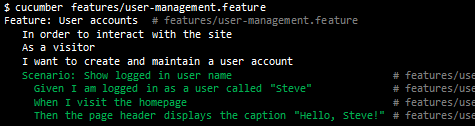
Because the GWT model inherently describes sequences of interactions, and because natural-language .feature files are inherently decoupled from the implementation code (they don’t mention the name of any classes or methods), this whole approach is a perfect fit for UI automation rather than unit-level testing.
Because you can describe scenarios in the language of your domain and user interface, your resulting feature files should make perfect sense to business experts. So, unlike traditional unit test driven development, this methodology can finally deliver on the promise of executable specifications that are actually useful as documentation.
Doing it in .NET with SpecFlow

As I mentioned, Cucumber itself is a Ruby tool. At the end of this blog post I’ll discuss some options for running the original Cucumber tool in a .NET environment, but for now let’s forget about that – you can sidestep all that complexity with SpecFlow.
SpecFlow is an open-source .NET tool that lets you write specifications using 100%-Cucumber-compatible Gherkin syntax, and has a number of advantages over Cucumber itself:
- It integrates with Visual Studio, which means you get File->New templates for creating new feature files
- More crucially, it gives complete VS debugger support, so you can set breakpoints on Given/When/Then lines in your .feature files and step through their execution
- You can implement your step definitions in *any .NET language *
- When you compile a project containing SpecFlow feature files, the output is an NUnit test assembly, so you can use your favourite NUnit-compatible test runner or existing CI infrastructure to run the specifications with no additional configuration.
- It doesn’t have such a ridiculous name
 It’s sad, but at one of my recent clients, several managers refused to take Cucumber seriously and wouldn’t pay attention to Cucumber specifications purely because of the name. That’s the real world for you!
Example: Combining ASP.NET MVC, SpecFlow, and WatiN
To give you something concrete to get started with, I’ve made a very simple ASP.NET MVC 2 example application, built following the BDD workflow and with a full set of specs. To try it out,
- First download and install SpecFlow (choose either the VS2008 or VS2010 version)
- Download and open the Guestbook source code from Github
- Compile and open Guestbook.Spec.dll in NUnit GUI
You should easily be able to understand in high-level terms what the application does by reading the Gherkin specifications. Just imagine these specifications are the written result of a design meeting where you’ve got your client or boss to tell you how the user interactions should work.
Feature: Browsing
   In order to see who's been on the site
   As a user
   I want to be able to view the list of posts

Scenario: Navigation to homepage
   When I navigate to /Guestbook
   Then I should be on the guestbook page

Scenario: Viewing existing entries
   Given I am on the guestbook page
   Then I should see a list of guestbook entries
    And guestbook entries have an author
    And guestbook entries have a posted date
    And guestbook entries have a comment
Feature: Posting
   In order to express my views
   As a user
   I want to be able to post entries into the guestbook

Scenario: Navigation to posting page
   Given I am on the guestbook page
   Then I should see a button labelled "Post a New Entry"
   When I click the button labelled "Post a New Entry"
   Then I am on the posting page

Scenario: Viewing the posting page
   Given I am on the posting page
   Then I should see a field labelled "Your name"
    And I should see a field labelled "Your comment"

Scenario: Posting a valid entry
   Given I am on the posting page
     And I have filled out the form as follows
       | Label          | Value             |
       | Your name      | Jakob             |
       | Your comment   | Das ist gut!      |
   When I click the button labelled "Post"
   Then I should be on the guestbook page
    And I see the flash message "Thanks for posting!"
    And the guestbook entries includes the following
       | Name      | Comment      | Posted date          |
       | Jakob     | Das ist gut! | (within last minute) |
Whenever you hit save while editing one of these files, SpecFlow generates a C# NUnit test fixture containing a [Test] method for each scenario. You don’t have to know or care about that, though. All you have to do is create step definitions in C# to match the lines in the Gherkin files.
At first, you won’t have any matching step definitions, so the NUnit test runner will show the tests as “inconclusive”:
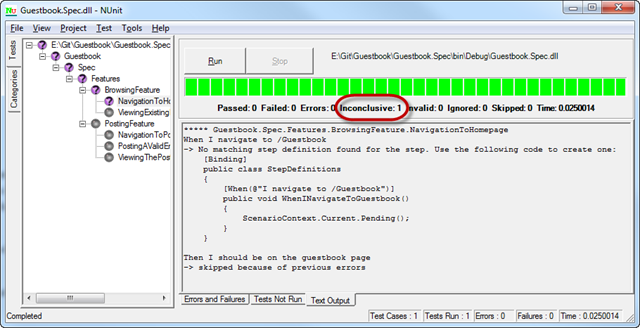
Notice that in the “Text Output” tab it provides C# stub code to create a matching step definition. Here’s some examples of the finished step definitions, written using WatiN to automate a browser:
[When(@"I navigate to (.*)")]
public void WhenINavigateTo(string relativeUrl)
{
    var rootUrl = new Uri(ConfigurationManager.AppSettings["RootUrl"]);
    var absoluteUrl = new Uri(rootUrl, relativeUrl);
    WebBrowser.Current.GoTo(absoluteUrl);
}

[Then(@"I see the flash message ""(.*)""")]
public void ThenISeeTheFlashMessage(string message)
{
    var flashElement = WebBrowser.Current.Element("flashMessage");
    Assert.That(flashElement.Text, Is.EqualTo(message));
}

[Given(@"I have filled out the form as follows")]
public void GivenIHaveFilledOutTheFormAsFollows(TechTalk.SpecFlow.Table table)
{
    foreach (var row in table.Rows) {
        var labelText = row["Label"] + ":";
        var value = row["Value"];
        WebBrowser.Current.TextFields.First(Find.ByLabelText(labelText)).TypeText(value);
    }
}
There’s lots more I could say about WatiN syntax and Gherkin best practices, but this is a pretty long post already so I’ll leave that to others.
In case anyone’s wondering, I’m not trying to claim with this post that Cucumber-style UI automation tests are the one true way to do BDD, or that unit testing is dead. UI automation tends to be much more difficult to do than unit-level tests, because there are many more moving parts and you have to concern yourself with test data, setup and teardown, etc. Seriously, it is hard work, and requires a lot more persistence and dedication than mere unit testing, though it can also give many extra benefits especially with regard to detecting regressions.
What about Running Cucumber Itself on .NET?
If, for some reason, you don’t want to use SpecFlow and would rather run the original Ruby-based Cucumber tool, there are two main options for .NET programmers:
- Use IronRuby. The current version of IronRuby is entirely capable of running Cucumber. It isn’t as easy to set up as SpecFlow, but only took me 30 minutes or so. The drawbacks are that (1) you have to write step definitions in Ruby, unless someone can come up with a clever way to call arbitrary .NET methods directly, (2) it runs Cucumber pretty slowly, at least in my testing, and (3) it doesn’t trivially integrate with existing CI infrastructure like an NUnit-based solution does.
- Use Cuke4Nuke. This is an open-source project that aims to bridge the gap between the original Cucumber tool running on any Ruby interpreter (not necessarily IronRuby) and step definitions written in .NET. It works by hosting your .NET step definitions in a small .NET-based “server” application, which Cucumber communicates with over a TCP/IP connection. I must admit I had a bad experience trying to make this work – it took hours. The latest Ruby interpreter didn’t include all the necessary libraries for Cuke4Nuke, and then when I’d hacked all the dependencies together, it wasn’t clear to me where to put the magic “cucumber.wire” file or what parameters you can use with the .NET server app. And then it was also pretty slow compared to keeping everything in .NET with SpecFlow. And it had a very limited API for running setup/teardown code around scenarios.
If you want to write step definitions in a .NET language, I don’t know why you wouldn’t just use SpecFlow. Since it’s 100% Gherkin-compatible, your feature files could in future be moved to a different implementation if desired. If you’ve tried others, I’d be interested to hear about your experiences. And no, I haven’t tried Spectre yet.
Injecting Mocks into a Running ASP.NET Application
In the next post, I’ll show you one possible way to simplify or speed up UI-level specifications a little. It’s a cross-process code injection library that, among other things, you can use to inject a mock database into a running ASP.NET application without it knowing about it. Or, you can override configuration, or maybe simulate the passing of time.
Sometimes, it isn’t desirable to meddle with your app’s internals, but sometimes it is. Ruby coders can already do it using Webrat or cross-stub, and I’ve found reasons to want that power over .NET apps too.