Introducing Knockout, a UI library for JavaScript
Knockout is a JavaScript library that makes it easier to create rich, desktop-like user interfaces with JavaScript and HTML, using *observers *to make your UI automatically stay in sync with an underlying data model. It works particularly well with the MVVM pattern, offering *declarative bindings *somewhat like Silverlight but without the browser plugin.
So, what distinguishes this from all the other similar-sounding JavaScript libraries? (I blogged about an MVC/templating system for JavaScript back in 2007, Microsoft has suggested a data linking system for jQuery, and Google’s full of MVC-on-the-client toolkits.)
Well, Knockout combines some different ideas that open up very powerful possibilities:
- Automatic dependency tracking: At the heart of Knockout is a system of observable variables and other variables computed as functions of them. For example, if you have firstName and lastName and then define fullName by concatenating these together, the framework knows that whenever either firstName or lastName changes, it must re-evaluate fullName. You don’t have to configure this – it’s inferred from your code execution, even if you have chains of observables referencing other observables.
This makes it easy to build sophisticated view models in which changes to a few key properties automatically ripple out to all other affected parts of the model. - Declarative bindings: By adding a data-* attribute (part of the HTML 5 spec, and works fine in older browsers, including IE 6) you can quickly bind appearance and behaviour in your HTML to properties on a view model. For example, you can write , and then the element will display the value in your model property as text, automatically updating if any of the underlying data changes. Besides text, I’ve included a range of commonly useful declarative bindings (e.g., visible, click, and css), and you can easily plug in custom ones.
- Nested templates: When you have a rich structure of view model data to display, it makes sense to display it using a template to keep your code simple. Knockout handles this easily by letting you bind a DOM node to a template and some data. Whenever either changes, the template gets re-rendered and your UI is updated. You can use data-bind attributes from inside templates (referencing any variable in scope at that point during template execution, such as foreach loop variables) to concisely add further interactivity. Plus, you can bind to templates from within templates, creating chains of nested templates. Because of how dependency tracking works, if the underlying data changes, Knockout knows it only needs to re-render the innermost templates affected by the change, so it’s efficient. Knockout uses the jquery-tmpl template engine by default, but you can plug in another template engine if you prefer some other template syntax.
These features together, combined with following the MVVM design pattern, mean you can apply sophisticated UI behaviours in a clean, concise, and organized way. It’s also possible to combine custom bindings and templates to create reusable controls (or plugins).
Extremely Trivial Example
OK, code. You could set up a view model as follows:
<script type="text/javascript">
    var myViewModel = {
        personName : ko.observable("Bert") // Initial state
    };
</script>
Then, you could bind it to an HTML UI as follows:
Enter your name:
<input id="source" data-bind="value: personName, valueUpdate: 'keyup'" />

<div data-bind="visible: personName().length > 5">
    Wow, what a long name you have.
</div>
Now, the text box will take its value from personName, and will automatically update its value whenever personName changes. The binding is two-way, so when you type into the text box, this updates personName.
The DIV with the “what a long name” message will be made visible whenever the name length exceeds 5 characters, and hidden otherwise. By referencing an observable value in a binding, you’ve implicitly set up notifications.
But I can just do that with jQuery!
Yes, we all love jQuery! It’s a fantastic replacement for the hideous DOM API we had to work with before.
The point of Knockout is not to replace jQuery – I expect most people who use Knockout will use jQuery too. The point is to make it easy to have one coherent underlying data model and then bind your UI to that. Change the data model and the UI changes, and vice-versa. That way, you don’t get complicated event handlers that have to update loads of different parts of the DOM to keep the UI up-to-date; instead, when you just change the underlying data model, you know all the affected UI gets updated. This also makes client-server interactions much easier: when saving data, you don’t have to try to scrape the current state off a load of DOM elements – you’ve already got it in a clean model. Likewise when loading data from the server and wanting to update the DOM to match – just push it into the data model and the UI is updated. It’s the MVVM pattern, much beloved of Silverlight developers.
A More Detailed Tutorial
Right, getting beyond “hello world” but still keeping things simple, let’s make a simple list editor. This will demonstrate some of Knockout’s core features – observables and bindings (though we’ll ignore templating for now – you can learn about that from other examples).
To get started, create an HTML file that references knockout.js or knockout-min.js and define a simple view model class. In JavaScript, any function can act as a class constructor. The following one has a single property which represents the items in a list.
<html>
<head>
    <script type="text/javascript" src="knockout.js"></script>
</head>
<body>
    <script type="text/javascript">
        var listEditorViewModel = function () {
            // ko.observableArray lets you track changes to a collection of things
            this.allItems = ko.observableArray(["Apple", "Banana", "Cherry"]);
        };
    </script>
</body>
</html>
Next, let’s display the list on the screen. You can do that by creating an HTML
<div>List items:</div>
<select multiple="multiple" data-bind="options: allItems"></select>
<script type="text/javascript">
    var listEditorViewModel = function () {
        ... as before ...
    };

    ko.applyBindings(document.body, new listEditorViewModel());
</script>
If you open this in a browser, you’ll see the list items:
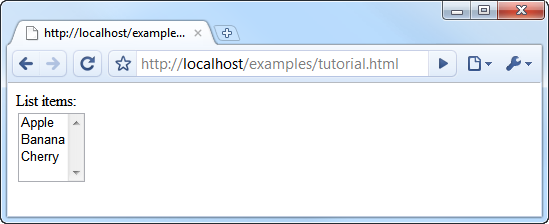
What about letting the user add some more items to the list? Update the view model class so that it has another property for tracking the new item a user is adding, and add a method that pushes the new item into the array:
var listEditorViewModel = function () {
    // ko.observableArray lets you track changes to a collection of things
    this.allItems = ko.observableArray(["Apple", "Banana", "Cherry"]);

    // ko.observable tracks a single item. The initial state here is an empty string.
    this.itemToAdd = ko.observable("");

    this.addItem = function () {
        this.allItems.push(this.itemToAdd());
        this.itemToAdd(""); // After adding an item, reset itemToAdd to an empty string
    }
};
Next we need to add some UI elements and bind them to these new model members.
<form data-bind="submit: addItem">
    Add item:
    <input data-bind="value: itemToAdd" />
    <button type="submit">Add</button>
</form>
That will do it! Now when the user edits the text box, its value automatically goes into the itemToAdd observable because of the value binding. When they submit the form, this invokes addItem() because of the submit binding. In turn, this updates allItems in the view model, and this automatically causes the on-screen list to be updated because its collection of options is bound to that model property. With Knockout, you don’t have to remember which parts of the UI to update following an event – you just change properties on the underlying view model, and anything bound to those properties will be notified and updated.
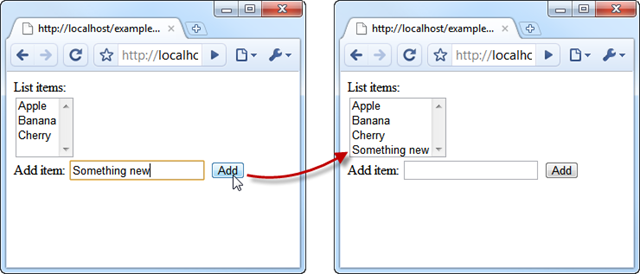
Next thing, we might want to let the user remove items. We should let them select multiple items at once, then have a “remove” button that removes them all. First, we need to know what the user has got selected, so add a new view model property to represent selection, and bind it to the HTML element using Knockout’s selectedOptions binding.
<select multiple data-bind="options: allItems, selectedOptions: selectedItems"></select>
var listEditorViewModel = function () {
    // ... leave the rest as before ...
    this.selectedItems = ko.observableArray([]); // Initially select nothing
};
Now you can read selectedItems to see what items are selected, and if you write a value to that observable, it will change what’s selected in the UI.
To let the user remove their selected items, add a button and bind clicks on it to a method on the view model:
<button data-bind="click: removeSelected">
    Remove selected items
</button>
var listEditorViewModel = function () {
    // ... leave the rest as before ...

    this.removeSelected = function () {
        this.allItems.removeAll(this.selectedItems());
        this.selectedItems([]); // Reset selection to an empty set
    }
};
That’s great – now the user can remove one or more items from the list. But it doesn’t make sense for them to click “Remove selected items” if they haven’t got anything selected. Let’s make the button enabled only when at least one item is selected:
<button data-bind="click: removeSelected, enable: selectedItems().length > 0">
    Remove selected items
</button>
Easy! You can use arbitrary JavaScript expressions in bindings. If your bindings reference one or more observables, they’ll be re-evaluated automatically any time those observables change. So now the “Remove” button becomes enabled or disabled depending on whether anything is selected.
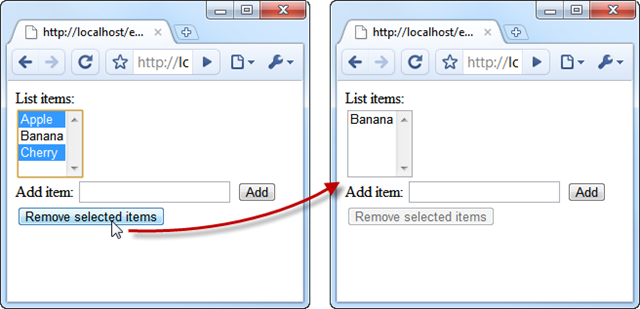
What if you wanted to let the user sort the items into alphabetical order? Again, you could do this by adding a method to the view model and binding a new button to that method. Alternatively – just to show you that you can use function literals in bindings – here’s a standalone way to do it:
<button data-bind="click: function() { allItems.sort() }, enable: allItems().length > 1">
    Sort
</button>
I’ve made this button enable only when there are at least two items (it’s pointless to “sort” a single item). Notice that selection is retained, because we didn’t change selectedItems.
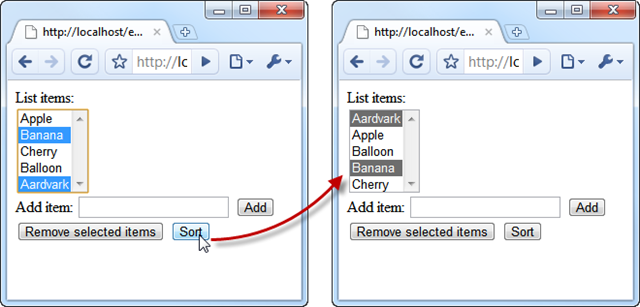
That’s a fair bit of functionality in just a few lines of code. As I explained earlier, the benefit of Knockout and the MVVM pattern is that it scales very well in complexity – you don’t have to track how one part of the UI affects another; you just manipulate your view model and all affected parts of the UI change on their own. For example, in the preceding tutorial, removing items can make the ‘Sort’ button become disabled, but we didn’t have to write any explicit code in a ‘Remove’ click handler to make that happen.
To build on this knowledge, see the online demos of other examples (arranged in order of increasing sophistication) and look at their HTML source code to see how it’s done.
Requirements, Licensing, and Browser Support
Knockout is written in pure JavaScript, so it has no server-side requirements at all. Your web application can be written in ASP.NET MVC, PHP, Ruby on Rails – whatever.
The core of Knockout doesn’t depend on any other JavaScript library. However, the default template engine, jquery-tmpl, obviously depends on jQuery. If you don’t like that you can plug in another template engine, but I expect most people will be using jQuery anyway.
Regarding browser support, I’ve designed and tested it to work with IE 6 – 8, Firefox 2 – 3.6, and current versions of Chrome, Safari (verified on Windows and iPhone), and Opera. I fully expect it to work with older versions of Chrome, Safari, and Opera, but haven’t tried it – there’s only so much browser installation one person can bear… There’s a good set of automated specifications (BDD-style, written using JSSpec) so you can run these on any browser/platform to get a good sense of what features are working. Hopefully all of them 
I’m releasing this project under the Ms-Pl license (an OSI-approved license). Some of my other code is licensed in the same way, so this keeps things simple for me, and it means you can use the library in any commercial or non-commercial project.
Where do I go from here?
For more details, examples, source, and downloads, see the project’s homepage at http://knockoutjs.com